vi režim
Úvod

Kate's VI mode is a project to bring Vim-like, modal editing to the Kate text editor and by extension to other KDE programs who share the same editor component. The project started as a Google Summer of Code project in 2008 – where all the basic functionality was written. I have continued to maintain and further develop this code and the number of missing features from Vim are slowly decreasing. Most Vim users will already be productive in Kate's VI mode. A list of what's missing is found at the bottom of the page.
This page is meant to be an updated overview of this work.
Settings → Configure Kate… → Editing → VI Input Mode.
It can also be toggled with the "VI Input Mode" setting in the "Edit" menu. (The default shortcut key is Meta+Ctrl+V – where Meta usually is the Windows key).
Ciele
The goal of the VI mode is not to be a complete replacement for Vim and support all Vim's features. Its aim is to make the "Vim way" of text editing – and the Vim habits learned – available for programs using the Kate text editor as their internal editor. These programs include
- The Kate Text editor
- KWrite – KDE's simple text editor
- KDevelop – An advanced IDE for many programming languages
- Kile – A LaTeX editor
The VI mode aims integrate nicely with the programs and deviate from Vim's behaviour where it makes sense. For example, :w will open a save dialogue in Kate's VI mode.
Incompatibilities with Vim
There are only a few features of Kate's VI mode which are incompatible with Vim (not counting things missing). They are listed below together with the respective reasons.
- Kate:
UandCtrl+ris redo
Vim:Ctrl+ris normal redo,Uis used to undo all latest changes on one line
The reason for havingUact as redo in Kate's VI mode is that the shortcutctrl+rby default is taken by Kate's replace function (search and replace). By default, the VI mode won't override Kate's shortcuts (this can be configured in Settings → Configure Kate… → Editing → Vi Input Mode), therefore a redo-action needs to be available as a “regular” key press, too. Besides, the behaviour of the U command in Vim doesn't map well to Kate's internal undo system, so it would be non-trivial to support anyway. - Kate:
:printshows the "print" dialogue
Vim::printprints the lines of the given range like its grandfather ed Commands like :print are available not only in the VI mode but for users using “regular” Kate, too – I have therefore chosen to let the:printcommand open the print dialogue – following the principle of least surprise instead of mimicking Vim's behaviour. - Kate:
Yyanks to end of line.
Vim:Yyanks whole line, just likeyy. VI's behaviour for theYcommand is in practice a bug; For both change and delete commands,cc/ddwill do its action on the current line andC/Dwill work from the cursor column to the end of the line. However, bothyyandYyanks the current line.In Kate's VI ModeYwill yank to the end of the line. This is described as "more logical" in the Vim documentation. - Kate:
:mapalters the selected lines of the document using the provided JavaScript expression.
Vim::mapadds the provided mapping to Normal and Visual modes. The "map" command was already reserved by Kate; in 4.12+, you can use a combination of:nmapand:vmapto replace it.
Supported Commands
Supported normal/visual mode commands
| Kláves | Popis |
|---|---|
| a | Enter Insert Mode and append |
| A | Enter Insert Mode and append to EOL |
| Pi | Enter Insert Mode |
| I | Insert before first non-blank char in line |
| v | Enter Visual Mode |
| V | Enter Visual Line Mode |
| <c-v> | Enter Visual Block Mode |
| GV | Re-select Visual |
| O | Open new line under |
| O | Open new line over |
| J | Spojiť riadky |
| c | Zmeniť |
| C | Change to EOL |
| cc | Change line |
| s | Substitute char |
| S | Substitute line |
| dd | Odstrániť riadok |
| d | Vymazať |
| D | Delete to EOL |
| x | Delete char |
| X | Delete char backward |
| gu | Make lowercase |
| guu | Make lowercase line |
| gU | Make uppercase |
| gUU | Make uppercase line |
| y | Yank |
| yy | Yank line |
| Y | Yank to EOL |
| p | Vložiť |
| P | Paste before |
| R | Replace character |
| R | Enter replace mode |
| : | Prepnúť do príkazového riadku |
| / | Hľadať |
| u | Späť |
| <c-r> | Znovu |
| U | Znovu |
| M | Set mark |
| >> | Indent line |
| << | Unindent line |
| > | Indent lines |
| < | Unindent lines |
| <c-f> | Posun o stránku dole |
| <pagedown> | Posun o stránku dole |
| <c-b> | Posun o stránku hore |
| <pageup> | Posun o stránku hore |
| <c-u> | Scroll half page up |
| <c-d> | Scroll half page down |
| zz | Centre view on cursor |
| GA | Print character code |
| . | Repeat last change |
| == | Align line |
| = | Align lines |
| ~ | Zmeniť veľkosť písmen |
| <c-a> | Add to number |
| <c-x> | Subtract from number |
| <c-o> | Go to prev jump |
| <c-i> | Go to next jump |
| H | Switch to left view |
| <c-w><c-h> | Switch to left view |
| <c-w><left> | Switch to left view |
| J | Switch to down view |
| <c-w><c-j> | Switch to down view |
| <c-w><down> | Switch to down view |
| K | Switch to up view |
| <c-w><c-k> | Switch to up view |
| <c-w><up> | Switch to up view |
| L | Switch to right view |
| <c-w><c-l> | Switch to right view |
| <c-w><right> | Switch to right view |
| W | Switch to next view |
| <c-w><c-w> | Switch to next view |
| S | Rozdeliť horizontálne |
| S | Rozdeliť horizontálne |
| <c-w><c-s> | Rozdeliť horizontálne |
| V | Rozdeliť vertikálne |
| <c-w><c-v> | Rozdeliť vertikálne |
| GT-185 | Switch to next tab |
| GT-185 | Switch to prev tab |
| gqq | Format line |
| gq | Format lines |
| q. / q | Begin/ finish recording macro using the named macro register. |
Supported motions
| Kláves | Popis |
|---|---|
| h | Vľavo |
| <left> | Vľavo |
| <backspace> | Vľavo |
| j | Dolu |
| <down> | Dolu |
| <enter> | Down to first non blank |
| k | Hore |
| <up> | Hore |
| – | Up to first non blank |
| l | Vpravo |
| <right> | Vpravo |
| <space> | Vpravo |
| $ | To EOL |
| <end> | To EOL |
| To 0 column | |
| <home> | To 0 column |
| ^ | To first character of line |
| F | Find char |
| F | Find char backward |
| T | To char |
| T | To char backward |
| ; | Repeat last t. or f. command |
| , | Repeat last t. or f. command |
| n | Nájsť nasledujúci |
| N | Nájsť predchádzajúci |
| Gg | To first line |
| G | To last line |
| w | Word forward |
| V | WORD forward |
| b | Word backward |
| B | WORD backward |
| e | To end of word |
| E | To end of WORD |
| ge | To end of prev word |
| gE | To end of prev WORD |
| % | To matching item |
| `[a-zA-Z><] | To mark |
| '[a-zA-Z><] | To mark line |
| [[ | To previous brace block start |
| ]] | To next brace block start |
| [] | To previous brace block end |
| ][ | To next brace block end |
| * | To next occurrence of word under cursor |
| # | To prev occurrence of word under cursor |
| H | To first line of window |
| M | To middle line of window |
| P | To last line of window |
| GJ | To next visual line |
| gk | To prev visual line |
Supported text objects
| Kláves | Popis |
|---|---|
| iw | Inner word |
| aW | A word |
| iW | Inner WORD |
| aW | A WORD |
| I | Inner double quote |
| A | A double quote |
| I | Inner single quote |
| A | A single quote |
| I | Inner back quote |
| A | A back quote |
| ib | Inner paren |
| I | Inner paren |
| I | Inner paren |
| ab | A paren |
| A | A paren |
| A | A paren |
| iB | Inner curly bracket |
| O | Inner curly bracket |
| I | Inner curly bracket |
| aB | A curly bracket |
| A | A curly bracket |
| A | A curly bracket |
| I | Inner inequality sign |
| I | Inner inequality sign |
| A | A inequality sign |
| A | A inequality sign |
| I | Inner bracket |
| I | Inner bracket |
| A | A bracket |
| A | A bracket |
| I | Inner comma |
| A | A comma |
Supported insert mode commands
| Kláves | Popis |
|---|---|
| <c-d> | Zrušiť odsadenie |
| <c-t> | Odsadiť |
| <c-e> | Insert from below |
| <c-y> | Insert from above |
| <c-w> | Delete word |
| <c-r>. | Insert content of register |
| <c-o> | Switch to normal mode for one command |
| <c-a> | Increase number under cursor |
| <c-x> | Decrease number under cursor |
The Comma Text Object
This is something that I have been missing in Vim. The comma text object makes it easy to modify parameter lists in C-like languages and other comma separated lists. It is basically the area between two commas or between a comma and a bracket. In the line shown in the illustration to the right, the three ranges this text object can span are highlighted in red.
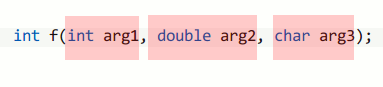
Comma text object ranges. If the cursor is over, say, “arg2”, pressing c i , (“change inner comma”) would delete “double arg2” and place the cursor between the two commas in insert mode. A very convenient way to change a function's parameters.
Emulated Vim Command Bar
Kate 4.11 introduced a hidden config option that make /, ? and : bring up a new search/ command in place of the usual Kate Find / Replace / Command-line bar. The bar is intended to replicate many of the features of Vim's command bar, and also to fix many of the issues with Kate Vim mode's interaction with Kate's Find/Replace bar (interactive replace not working; incremental search not positioning the cursor correctly; not usable in mappings/macros; etc).
The following shortcuts are provided by the emulated command bar; as with Vim, these can be remapped with cmap, cnoremap, etc:
| Kláves | Popis |
|---|---|
| <c-r>. | insert contents of register. |
| <c-r><c-w> | Insert word under the (document) cursor. |
| <c-p> | Invoke context-specific completion (see below) move back/ up in the completion list. |
| <c-p> | Move forward/ down in the completion list. |
| <c-space> | Kate Vim Extension. Auto-complete word from document. |
| <c-d> | Kate Vim Extension. In a sed-replace expression (i.e. s/find/replace/[g][c][i]), clear the "find" term and place the cursor there. |
| <c-f> | Kate Vim Extension. In a sed-replace expression (i.e. s/find/replace/[g][c][i]), clear the “replace” term and place the cursor there. |
| <c-g>. | Kate Vim Extension. As with ., insert the content of the named register, but escape it in such a way that when used with a search, we search for the literal content of the register; not the content of the register interpreted as a regex. |
The "context-specific completion" is decided as follows:
- In a search bar (
/or?), auto-complete from search history (which includes searches initiated via*; and#; searches done in sed-replace expressions; etc.) - In an empty command bar (
:), auto-complete from command history (NB: auto-completion of command names is invoked automatically when you begin typing). - In a command-bar containing a sed-replace expression (e.g.
:s/find/replace/gc), if the cursor is positioned over "find", auto-complete from the "search" history; if over the "replace", auto-complete from the history of "replace" terms.
When executing a sed-replace expression in the command bar with the "c" flag (e.g. s/find/replace/gc), a Vim-style interactive search/replace expression will be initiated.
Some example usages of the emulated command bar, with GIF animations, are given in this blog. In 4.11, the emulated command bar can be enabled by setting the hidden config option "Vi Input Mode Emulate Command Bar" to true in your katerc/kwriterc/kdeveloprc.
Funkcie
As stated earlier, the goal of Kate's VI Mode is not to support 100% of Vim's features, however, there are some features which are sorely missed
- Visual block mode – especially the ability to prepend/append text to the visual block selection.
- Having ex commands available in other programs than the Kate application.
- The search code needs improvement and the * and # commands should just be regular searches.
If you miss other features or want to help on the ones mentioned above, feel free to contact me or send patches! :-)
Zoznam zmien
- 2010-05-16:
Initial version. Collected the information from blog entries and README files to make a single source of current information. - 2010-05-17:
Ctrl+AandCtrl+Xadded (increment/decrement number under cursor). - 2010-08-30:
Moved page to kate-editor.org. - 2010-09-10:
Fixed the text on the comma text object and made some formatting fixes - 2021-02-03:
Converted key-binding tables to markdown for hugo.