• Kate in KDE 4.10

    by  • January 6, 2013 • Developers, Events, Users • 31 Comments

    According to our release schedule, KDE SC 4.10.0 will be available to the public in early February 2013. Following Kate in KDE 4.7, Kate in KDE 4.8 and Kate in KDE 4.9, this blog post highlights what’s new in Kate in KDE 4.10.

    New Features

    News in the Plugins World

    • Kate’s Pate plugin now provides several new plugins by default, with Python 3 support.
    • Kate gained a new and very powerful Project plugin with ctags code completion. It is tightly integrated with the Search & Replace plugin as well as the GDB Plugin and the Quick Open feature.
    • Kate Search & Replace plugin gained find-as-you-type support.

    Improvements

    Bug Fixes

    Most of the following work was done during the yearly KDE conference and especially the joint Kate/KDevelop meeting this October in Vienna. A massive bug database cleanup was performed mainly by Christoph, so we closed several hundreds of bug reports, where ~280 are really fixed. So we are down to a total of 400 reports (only 70 of these 400 reports are bugs), where we initially had > 800 open issues. This also is reflected in the Kate bug charts:
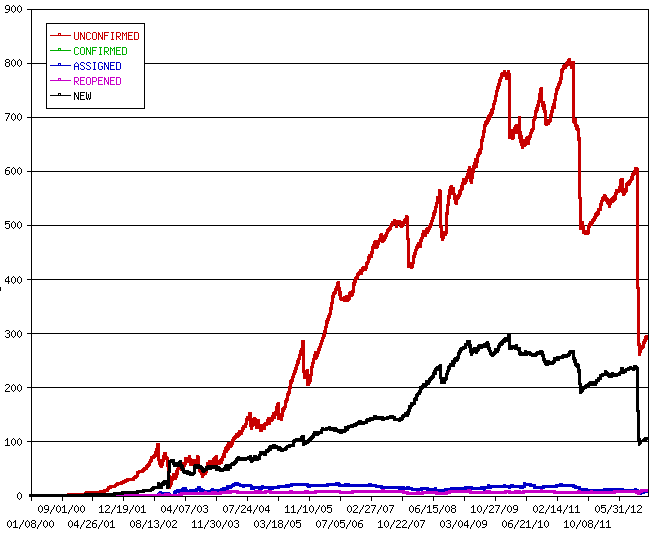
    Thanks to all contributors to make yet another release rock! :-) And as always: We are happy for every contribution, so check out the Kate sources and send us patches! We hope you enjoy using Kate as much as we enjoy its development :-)

    About

    Dominik is a PhD student at the Control Theory and Robotics Lab, TU Darmstadt, as part of the Research Training Group GKMM (GRK1362). My research focuses on state estimation in distributed systems. As hobby, I contribute to the KDE project and work on the Kate application and editor component.

    http://www.kate-editor.org

    31 Responses to Kate in KDE 4.10

    1. uniq
      January 6, 2013 at 21:33

      I like the changes and bugfixes. Thanks a lot for all the hard work. I hope you had fun programming it, too.

    2. January 6, 2013 at 22:30

      Awesome, my favourite text editor just got even better! Hope there will be a KDE for Windows release again soon (last was in Feb 2012), since I have to work on Windows a lot these days.

    3. Heller
      January 6, 2013 at 22:44

      thank you to all the Kate people ! Kate is my editor of choice since many years now :)

    4. Jean
      January 9, 2013 at 03:52

      Very nice work, thanks to all the team for this !
      If you ever have the time to include to include this Zen Coding plugin :
      https://github.com/kursusHC/Zen-Coding-for-Kate

    5. zamiere
      February 1, 2013 at 17:22

      It’s possible to create a tmTheme to kateschema converter?

      • February 3, 2013 at 19:41

        Our exported format is just some kind of ini-file. Therefore I guess that should be no big problem, if somebody has the time and energy for this ;)

    6. ion
      February 6, 2013 at 19:59

      Anybody else has problem with missing selection highlight?

      • Anio
        February 7, 2013 at 11:00

        I have the same problem. The selection highlight is so helpful for me. Also Auto-bracket is changed (it deletes the selected word now instead to wrap it in brackets/quotes.
        And finally – Python plugins are crashing my editor….

        • February 7, 2013 at 15:32

          Is the plugin enabled in the Editor Plugins config dialog?
          Nothing changed with respect to the “Highlight Selection” plugin, so it should just work?!
          What distribution are you using?

          • Thomas
            February 7, 2013 at 15:36

            For me, the plugin is not listed in the config dialog anymore. I’m on Kubuntu 12.10

            • February 7, 2013 at 15:40

              Can you contact the kubuntu guys?
              What language do you use? English or something else?
              What happens, if you start kate with: LANG=C kate
              Old bug: https://bugs.kde.org/show_bug.cgi?id=275548

            • Thomas
              February 7, 2013 at 16:48

              Starting kate with: LANG=C kate gives me the same result: the highlight selection plugin is not present.
              Do you guys missing the plugin also on Kubuntu ? If so, I’ll try to see with the Kubuntu team.

          • Anio
            February 7, 2013 at 15:44

            Under Editor Component -> Extensions i have only four extensions: Auto Brace, Exporter, IconInserter and Insert File
            It doesn’t exist under Application -> Plugins either
            What about the quote/brackets “wrap” functionality ?

            • February 7, 2013 at 16:45

              >What about the quote/brackets “wrap” functionality ?
              It was removed in favor of the auto-brace plugin. If the auto-brace plugin does not provide what you need, please file a bug report on bugs.kde.org for the Kate component :)

            • Emdek
              February 8, 2013 at 14:55

              @Anio, if you created bug report then please post number here, I’ll vote for it.

            • Emdek
              February 8, 2013 at 15:12

              Found it:
              https://bugs.kde.org/show_bug.cgi?id=314325

              @Dominik, sorry, but that plugin is not comparable at all to that feature.
              QtCreator finally gained such behavior and Kate just removed it. :-D

          • Pedro
            February 8, 2013 at 16:50

            Gentoo doesn’t have that Plugin either. On the Extensions menu, only the 4 plugins already mentioned are present.
            Really hope you manage to get this feature back; its difficult to live without it :(

    7. David
      February 7, 2013 at 10:22

      Hi ion, I have the same problem, when I select a word, no highlight… I hope this will be fixed asap.

    8. Thomas
      February 7, 2013 at 12:56

      Same here, I’m missing the selection highlight VERY much in KDE 4.10 !

    9. SeanT
      February 7, 2013 at 16:50

      I am also affected … :-( Same problem: the plugin is no longer listed. Gone … If I am not mistaken, was it not a standalone package called something like “kate-plugins” in KDE 4.9 ? There is no longer such a package in Kubuntu packaging of KDE 4.10 as far as I can tell …

      REALLY MISSING that feature !! Hope it will be fixed soon.

      • February 8, 2013 at 10:58

        https://bugs.kde.org/show_bug.cgi?id=314530
        Should be fixed for KDE 4.10.1

        • Thomas
          February 8, 2013 at 12:28

          Thank you for the link, the workaround described in the bug report works well, until it is fixed in 4.10.1.

          • David
            February 8, 2013 at 14:18

            Can you explain me how to apply this patch?
            Thanks

            • February 8, 2013 at 14:26

              Better just change 4.3 to 4.0 of the .desktop file as mentioned in the bug report. You need to run kbuildsycoca4 afterwards once.

        • SeanT
          February 9, 2013 at 00:48

          THAT DID IT !!! :-)

          Many thanks Dominik for providing the workaround ! Much appreciated !

    10. jambi
      February 22, 2013 at 01:52

      PLEASE ADD JAVA PLUGIN
      KATE IS AMAZING

      • February 22, 2013 at 09:58

        Unfortunately, we don’t have the resources to turn the editor into a full-fledged IDE with Java support. For that, please use KDevelop.

    11. March 6, 2013 at 18:20

      Python strings became comments in Kate 4.10 :(

      https://bugs.kde.org/show_bug.cgi?id=314773

      • June 19, 2013 at 10:04

        Should be fixed. Just download the highlighting file through the download dialog in the config pages.

    12. May 22, 2013 at 15:49

      I am not sure if this is a bug. When I paste text tab-characters are replaced with spaces. I want indent set to use spaces, but I think it is incorrect behavior to remove tab-characters from pasted text.