• Default Color Schemas

    by  • November 7, 2012 • Developers, Users • 19 Comments

    With KDE 4.10, the naming of the color schemas in Kate Part changed. Instead of having “<app name> – Normal” and “<app name> – Printing” we now just have “Normal” and “Printing,” meaning that all applications using Kate Part now share these color schemas. In other words: If you change the Normal schema in KDevelop, you also will see these changes in Kile, Kate, or any other application that embeds Kate Part. If you just want to change the color schema for a single application, create a new color schema and then use this new schema as default!

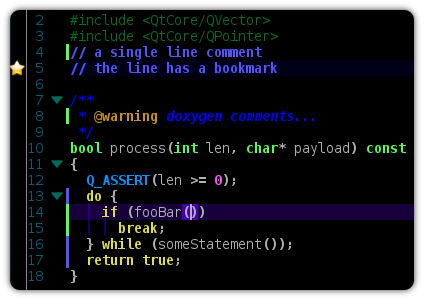
    Besides that, it’s been a looong way, but finally Kate will ship several default color schemas in KDE 4.10:

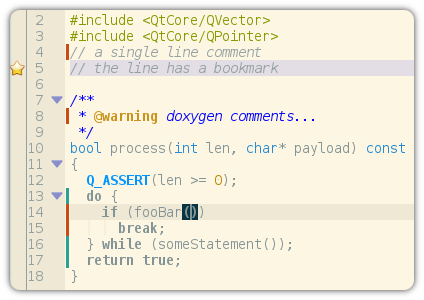
    Normal Color Schema

    Vim (dark)

    The colors are not all perfect, so we hope to improve them over time, so if you always wanted to contribute to Kate, we could need help here :-)

    About

    Dominik is a PhD student at the Control Theory and Robotics Lab, TU Darmstadt, as part of the Research Training Group GKMM (GRK1362). My research focuses on state estimation in distributed systems. As hobby, I contribute to the KDE project and work on the Kate application and editor component.

    http://www.kate-editor.org

    19 Responses to Default Color Schemas

    1. November 7, 2012 at 14:25

      Dominik! Das ist super!!! Really happy with this improvement, having a few popular color schemes shipped makes all users happier for sure! Another thing I was just wondering was whether we could easily map the colors in KDE’s normal color schemes to make all of them available (and still look good) in katepart, although I’m afraid that’s unrealistic! Anyway, pretty cool!

      • November 7, 2012 at 14:37

        Using KDE color already works for quite some time, see http://kate-editor.org/2012/03/01/color-settings/
        In addition to that, there will be a color scheme called “KDE”, which also uses default colors. But be warned, not all colors derived from the KDE color schema look good…

    2. November 7, 2012 at 16:31

      The real problem, however, is KDevelop semantic highlighting. From what I understand, it overrides the Kate syntactic highlighting, and the colors are pretty much hardcoded. What makes it much worse is that zwabel has left the team logn ago, and the code may not be as easy to understand.

      • November 7, 2012 at 17:49

        Let me call bullshit. The highlighting code is fairly easy and it’s just a matter of writing a config dialog or extending Kate’s highlighting. Someone just needs to do it.

        Oh and: The highlighting *already* uses katepart colors do auto-generate colors. Its just not perfect always and thus people sometimes want to customize the autogenerated colors.

        /me who uses a dark color scheme since ages

        • isemenov
          November 7, 2012 at 18:48

          Are you talking about semantic highlighting? I’m using kate and kdevplatform/kdevelop trunk and while the background color changes on kjde color scheme changes, the semantic highlighting does not, and it is unusable with dark kde color themes.

      • November 7, 2012 at 17:53

        Actually, I don’t see how this is related to this blog. KDevelop manages to generate colors just fine, and zwabel is not completely gone, and there are others who understand the code ;) So it even looks pretty good these days :-)

        • isemenov
          November 7, 2012 at 18:50

          See above. The auto-generated colors do not work with a dark color scheme for me, since they do not depend on the color scheme at all (at least that’s what I see). KDevelop uses the Kate text editor component, so it is related, since quite some people code in KDevelop, not just Kate or KWrite.

    3. isemenov
      November 7, 2012 at 19:03

      OK, now I have tested this feature in a trunk build. Indeed, when choosing the “KDE” color scheme in Kate/KDevelop, the KDE color scheme colors are used. But, what does the “Use KDE colors” button do? When I select e.g. Kate – Normal, and the KDE color scheme is dark, nothing happens at all even after pressing Apply.

      • isemenov
        November 7, 2012 at 19:07

        Also, changing “Dafault Schema” resets the font.

      • November 7, 2012 at 19:51

        The button “Use KDE Color Scheme” will unset all colors in the “Colors” tab, i.e. it won’t overwrite the KDE colors anymore, instead it will use the KDE color scheme and adapt itself automatically, when you change the KDE color scheme.
        It’s the same as pressing the yellow “recycle” icon next to the color buttons for all color items. The the button is just a quicker way to use the KDE color scheme… :-)

    4. November 8, 2012 at 21:06

      I would recommend taking a look at the very nice Tomorrow suite of colour schemes: https://github.com/chriskempson/tomorrow-theme#readme It’s both functional and easy on the eyes. It’s been tweaked for years, so the colours are pretty much perfect. :)

    5. November 10, 2012 at 18:02

      What about the hard-coded colors in syntax highlighting definitions? last time i checked, most authors of syntax definition files seemingly felt either that kate had not enough color roles or that those roles aren’t sophisticated enough.

      i propose that we:

      1. add more roles (optional)
      2. change the part where colors can be selected to only use color roles and no hardcoded colors (in all syntax definitions)
      3. remove support for hard coded colors.

      • November 10, 2012 at 20:24

        We will define more roles, that is really needed. And yes, I guess we need to re-evaluate if we really want hard-wired colors in the highlightings we ship. It can still be allowed, some people build highlights for their own use, there they can do like the want, still I would like to have no hard-coded colors in at least the most common stuff around in our git.

        • November 10, 2012 at 22:29

          having the option to do it encourages to take this option, at least if combined with reference syntax definitions using it.

          so i guess we should eliminate hardcoded colors from *all* definitions in the git, though this will most certainly need at least a few new color roles. also we should then mark hardcoded colors as deprecated/only for personal use in the documentation.

          is there a mailing list to discuss a possibly expanded set of color roles? or should i file a bug about that where the discussion can take place? i guess this blog’s comments isn’t the most obvious place to discuss how such a change should take place.

          also one that’s decided on, i’d like to volunteer porting schemes if someone tells me how to send pull requests.

          PS: great news about the color schemes btw.! that’s the only area where kate severely lacked features and you’re fixing it. woo!

    6. Jordi
      November 13, 2012 at 19:47

      Perhaps you could take some ideas from the fastest editor I have tried (unfortunately not libre software): http://www.sublimetext.com/

      • November 13, 2012 at 22:32

        Sublime is awesome, but I still use Kate for most tasks. Sublime’s color-theme support is better – but writing actual highlighting definitions is a major pain in the ass. Kate is much better in this respect. Also the SFTP support, embedded shell, drag’n’drop, and all the areas that can be changed with plugins are all simply things that sublime doesn’t have.

        What it has is

        1. Embedding highlighting schemes into one another (HTML + CSS + JavaScript is simply three individual files, one of which having two rules embedding the two others)
        2. Ease of plugin development: drop into a config directory another directory with build rules and highlighting config files, as well as some python scripts (all optional)