• Busy Kate/KDevelop Sprint results in Mini-Map

    by  • November 3, 2012 • Common • 14 Comments

    One of the results of the Kate/KDevelop sprint in Vienna is the new “MiniMap” that can be used instead of the vertical scrollbar. I came to the sprint with a black and white version of it for the symbols viewer, but got encouraged to integrate it to the core. The result, in cooperation with Sven Brauch from KDevelop, is a nice Mini-Map that can be enabled both in Kate and KDevelop.

    And to make this into a real blog and to provide proof, here are a couple of screenshots:
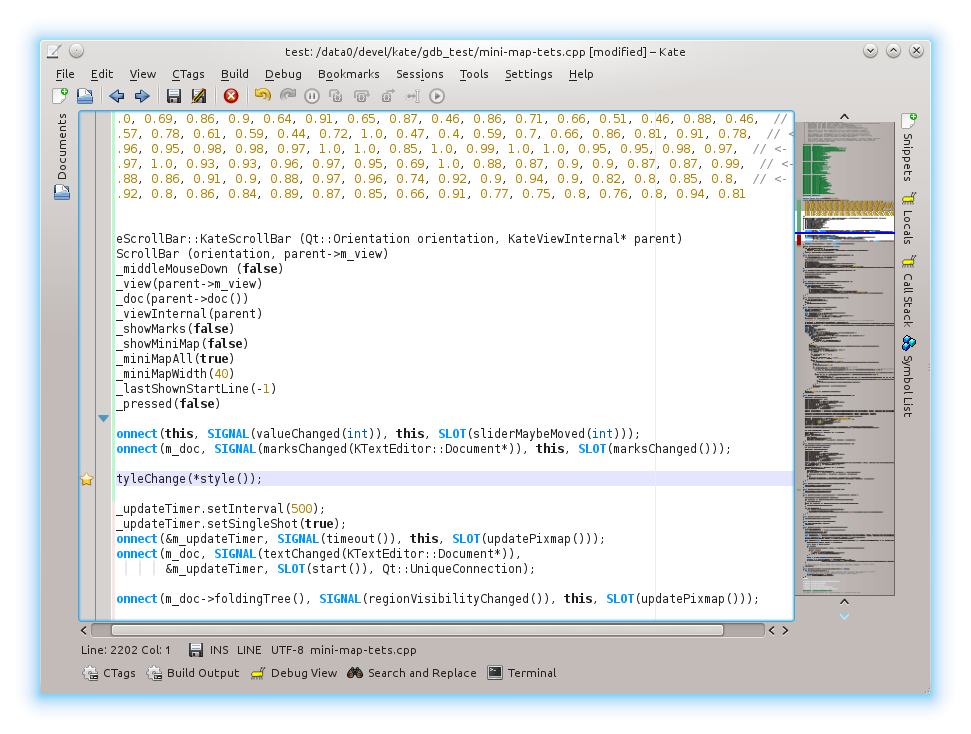
    The MiniMap enabled

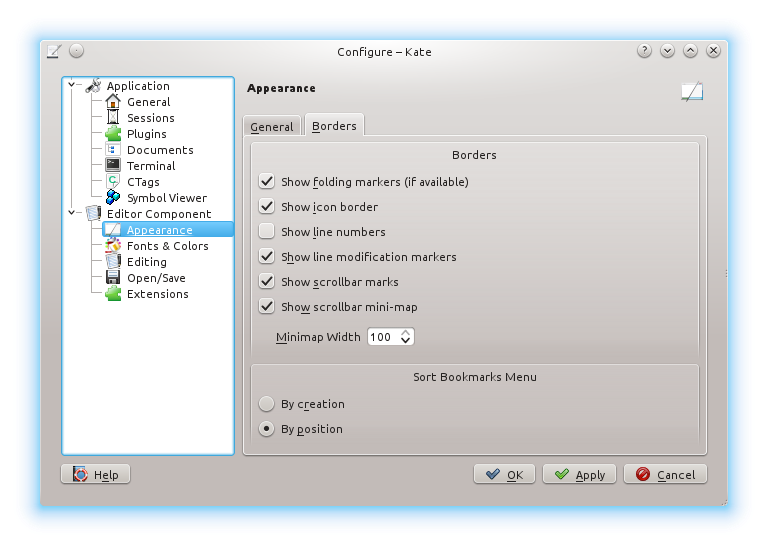
    Here is where/how you turn it on in Kate

    About

    14 Responses to Busy Kate/KDevelop Sprint results in Mini-Map

    1. November 3, 2012 at 13:22

      Nice work! This reminds me a bit of Sublime Text, they’ve implemented that feature is a really nice way.

    2. Blenarh
      November 3, 2012 at 14:24

      Cool :-) Just a question: does it adapt to the kate color scheme or to the KDE one ? (or are the colors hardcoded ?)
      Thanks for your work, I will definitely use it

      • Kåre Särs
        November 3, 2012 at 14:46

        The text color and the background follow the kate color scheme while the “shielding” is from the KDE color sheme.

    3. November 3, 2012 at 17:56

      How awesome!

      I wonder how you had enough time to implement all these really cool features at the sprint :)

    4. maninalift
      November 3, 2012 at 19:49

      i love you

    5. November 4, 2012 at 12:17

      Please don’t hide this great feature behind a settings checkbox where only few people will find it! Switch it on by default with a button on it to hide it. Most people will like it and if those who don’t have an easy way to hide it, it’s fine.
      But having to go to the settings and clicking a checkbox (with a label that doesn’t even make clear what it does) will unneccessarily limit its impact.

      • November 4, 2012 at 13:32

        Sorry, on per default is a no-go. Many apps use inline KatePart’s and won’t want to have this in the way. Actually if you use splitters a lot, the mini-map is too big to be usable ;) Still I like the feature.

        • November 4, 2012 at 17:03

          Okay, thats’ understandable. Would it be possible to have it on per default in Kate itself but off in KatePart? People using vertical splitters could still switch it off. Or maybe it could be switched off automatically if vertical splitters are used. Anyway you’re likely to need an easy way to switch because people may want it in one moment but not anymore in the next and don’t to go through the settings dialog each time. Settings is not meant for stuff you change often.

    6. Robert
      November 5, 2012 at 10:31

      Excellent. This was one of the things that was going to make me investigate editors other than kate.

    7. November 5, 2012 at 11:34

      Awesome! Reminds me of SeeSoft and work that extended it. You might have a look at: http://www.cs.rug.nl/~alext/PAPERS/InfoVis05/paper.pdf for inspiration on further improvements (well perhaps that’s a matter of taste).

    8. November 5, 2012 at 11:43

      I have moved on from Kate to VIM about a year ago, but this feature might just pull me back. Thanks, the minimap looks terrific!

    9. November 6, 2012 at 00:01

      Alright. This is divine. The most awesome text-editor and IDEs just got a lot more awesome.
      Please tell me this is gonna be in 4.10.

      • November 6, 2012 at 13:22

        This is gonna be in 4.10. There you have it ;)

    10. November 6, 2012 at 09:54

      That is a very nice addition, can’t wait till I got this here!! /me happy panda