• Data Recovery in 4.10

    by  • October 25, 2012 • Developers, Users • 6 Comments

    Recently I’ve blogged about the usage of KMessageWidget in the data recovery process in Kate Part. Finally, we decided to stick with KMessageWidget, since it is a standard kdelibs widget, used by a lot of KDE applications. Besides, it is visually appealing and attracts the user’s attention. In KDE SC 4.10, it will look like this:
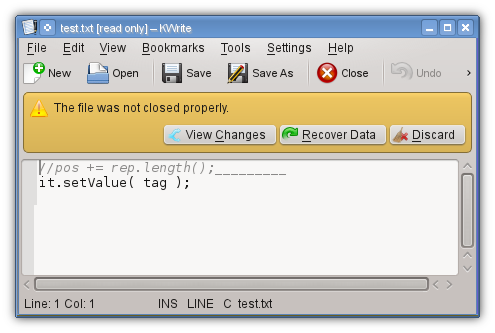
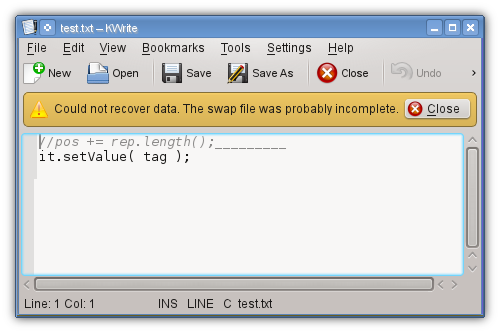
    Now if you recover the data, it may happen that the swap file is broken, e.g. because it was accidently manipulated for whatever reason. Then you get notified like this:
    Besides that, we are currently at our Kate/KDevelop meeting in Vienna. Lots of exciting stuff is happening, so expect more in the next days :-)

    About

    Dominik is a PhD student at the Control Theory and Robotics Lab, TU Darmstadt, as part of the Research Training Group GKMM (GRK1362). My research focuses on state estimation in distributed systems. As hobby, I contribute to the KDE project and work on the Kate application and editor component.

    http://www.kate-editor.org

    6 Responses to Data Recovery in 4.10

    1. MMM
      October 25, 2012 at 22:30

      At least for small data, kate could check if the data can be recovered before asking what to do. I always think it is frustrating if you have to decide something and it does not matter at all shortly after.

    2. Luther Blisset
      October 26, 2012 at 12:13

      Perhaps it’s just the image, but I’d say the icon for the “View Changes” option can’t be seen all that clearly, it looks partially cut or shrunk. It also may not suggest “View Changes” to a majority of the users (those that aren’t familiar with control version systems, branching and so on). Perhaps a different one could be used? An eye, maybe, as it’s quite universally recognised as something that is used to “view” things.

    3. juan
      October 26, 2012 at 23:04

      I suggest a usability correction. Check first whether the swap file is in a good state, and then, only if the file can be recovered from the swap file, notify the user with the recover data dialog.
      This way you gain two things:
      1. You don’t need anymore the last dialog.
      2. You don’t need to bother the user for something that can’t be done because the swap file is damaged.

      • October 29, 2012 at 01:12

        I indeed changed it that way: if the md5sum doesn’t fit, we’ll discard the file immediately due to corruption. So the 2nd diealog is never shown, I guess I can remove it then…

    4. kbroulik
      November 25, 2012 at 00:47

      Just read that read-only files now get a [read only] appendix to the title bar.
      What about adding a MessageWidget for these kinds of notifications as well? So we get an info bar “This document is opened in read-only mode because it contains lines longer than 5000 characters [Disable read-only mode] [X]“, I always found the read-only mode very non-discoverable and also often the reason for it to be read-only not obvious. A messagewidget like this would also get rid of the modal info box that pops up when opening such a file. :-)

    5. November 25, 2012 at 13:01

      Right, it even shows a message saying that. I’m not sure about the available buttons, though.