• Some Kate Color Schemas

    by  • March 7, 2012 • Users • 20 Comments

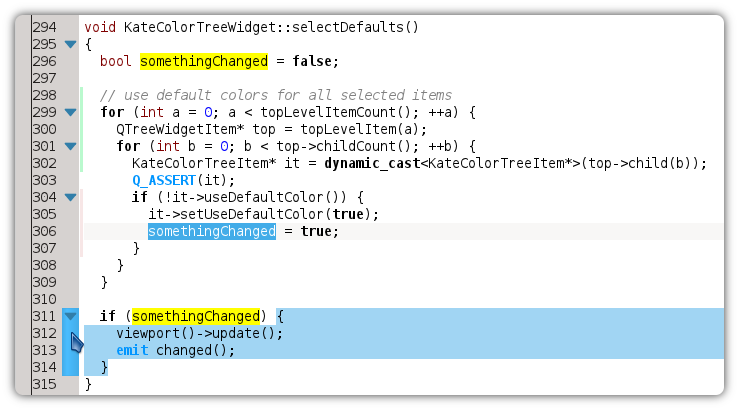
    As already mentioned, Kate Part much better chooses colors from the default KDE color palette configured in System Settings in upcoming KDE SC 4.9. As teaser, here are some examples – hope you like it.

    Default “Oxygen” Color Schema
    Default “Obsidian Coast” Color Schema 
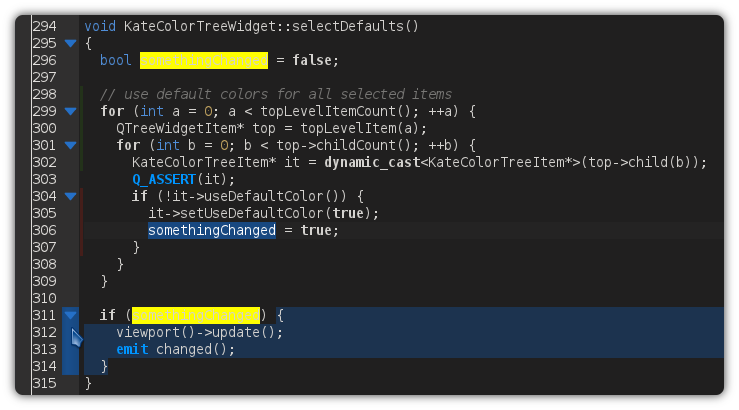
    Dark “Vim” Color Schema

    Note: The yellow search background comes from the “Highlight Selection” plugin, which is still a hard-coded yellow. Kate Part’s “Search & Replace”chooses more fitting highlight colors for matching and replaced text.

    About

    Dominik is a PhD student at the Control Theory and Robotics Lab, TU Darmstadt, as part of the Research Training Group GKMM (GRK1362). My research focuses on state estimation in distributed systems. As hobby, I contribute to the KDE project and work on the Kate application and editor component.

    http://www.kate-editor.org

    20 Responses to Some Kate Color Schemas

    1. March 7, 2012 at 23:53

      I built my own color scheme based on SublimeText’s Twilight color scheme, but since it only contains PHP/JS/CSS/HTML, I don’t feel confident enough to share it :)
      http://i.imgur.com/Z4Wyu.png

    2. anonymity is great
      March 8, 2012 at 01:01

      I very much like this. I am tired of changing my kate colors each time I change the default KDE color palette. Thank you, thank you, thank you very much!!!

    3. bassboy
      March 8, 2012 at 05:42

      That color scheme is very nice indeed. :)

      Kate really needs better default color schemes. The white oxygen scheme is blinding to my eyes.

    4. March 8, 2012 at 06:36

      Great work! lovely!

    5. drm
      March 8, 2012 at 14:15

      Would it be possible to implement the solarized schemes? Both versions (light/dark) are a joy to work with!

      > http://ethanschoonover.com/solarized

    6. Long
      March 8, 2012 at 21:21

      Heh, nice to have some good options to choose from :)

      • March 8, 2012 at 21:55

        These are not predefined options. The first two are given if you choose the KDE Color scheme accordingly. And the 3rd one was manually make by myself. But it’s not officially shipped with KDE 4.9. Sorry, if I did not make that clear :-)

    7. March 10, 2012 at 04:59

      I’ve been waiting for just this capability for a long, long time. This makes me very happy!

      • March 10, 2012 at 20:11

        When adding a new color scheme with “New…”, all colors are taken from KDE’s current color scheme. However, if you now switch KDE’s color scheme, the colors in the “Colors” tab adapt, but the colors of the text styles in “Normal Text Styles” and “Highlighting Text Styles” will not automatically adapt. This requires another major change in the code.

        Still, by creating a new one, you get a nice KDE-integrated scheme. So at least we have a workaround…

    8. Flo R Moser
      May 8, 2012 at 21:36

      any chance of getting the oblivion-coast theme for kate 4.8?

    9. June 20, 2012 at 07:33

      hi, I just installed the color schemes on my Opensuse12.1 with Kate, but the Kate still shows no color at all.

      • September 19, 2012 at 21:05

        Create a new color schema. And then for all colors in the first tab, the system colors are used.

    10. Plaristote
      September 19, 2012 at 11:09

      Is Dark Vim nothing but a chimera ?
      I need it right now and it doesn’t seem to exist anywhere :/ !

      • September 19, 2012 at 21:07

        As I said, predefined color schemas are not included. You have to create a new one and modify the colors. But that’s a matter of a few minutes. Not optimal, but you should get what you want. ;)

      • September 23, 2012 at 14:59

        Ok, there you go: http://pastebin.com/xtHDhjQ6
        Download this file and import it in Kate. Then you should have a “Vim (dark)” color schema. Haven’t tested it, but should do the trick :-)