Kate in KDE 4.8
About half a year ago, Kate 3.7 was released as part of KDE 4.7. Now that KDE 4.8 is about to be released, let’s have a look at what Kate brings in KDE 4.8.
Bug Fixes
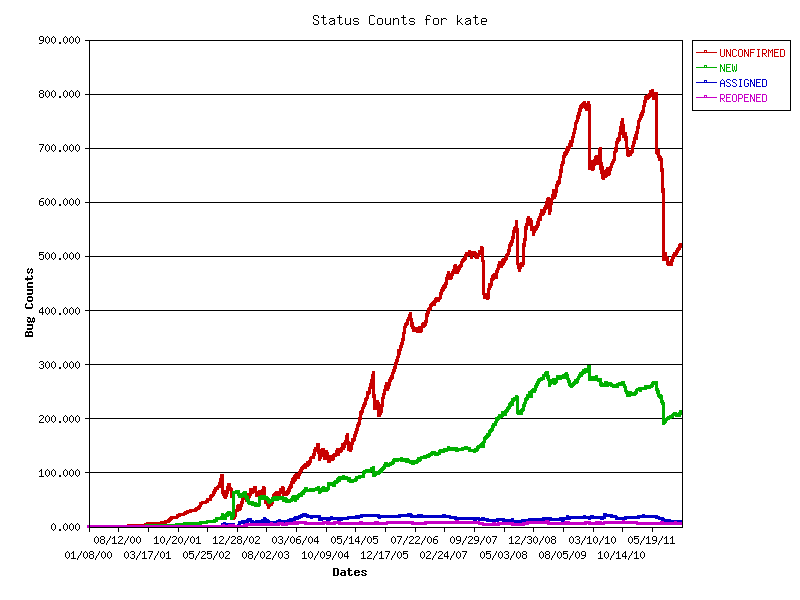
According to KDE’s bug tracker, about 190 issues were solved. Taking a closer look, lots of small issues were fixed, amongst them:
- improved printing support (report 1, report 2, report 3, report 4, report 5, and more)
- syntax highlighting files added and updated
- zoom in/out with ctrl+mouse wheel, scroll over folding area
- wrong active view when resuming session with split view
- ambiguous shortcuts in file system browser resolved
- improved GDB plugin
- we heavily cleaned up our bug database (bugs + wishes):
Heavily Reworked Code Folding
As part of the Google Summer of Code (GSoC) 2011, the code folding code was improved. The main goal was to eliminate wrong folding behavior and fix all crashes while making the code more maintainable. We are quite happy with the results: Given the robust behavior, it now was possible to remember code folding state past sessions and during document reload. So folded regions are not lost anymore.
Additionally, the visual appearance was changed to be rather decent.
Improved Vi Mode
Also as part of the GSoC 2011, Kate’s vi input mode was heavily improved.
Search & Replace in Files
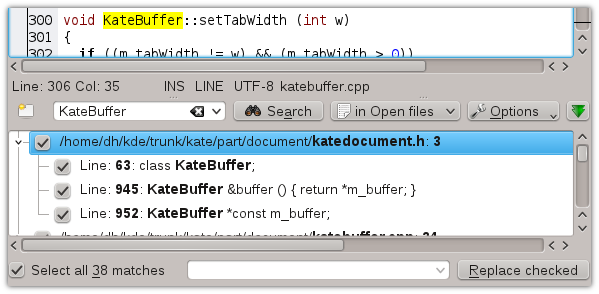
The “Find in Files” plugin is now replaced with the new “Search and Replace” plugin: It basically contains all the features of “Find in Files,” but additionally has the following features:
- either search in files-on-disk, or in all the opened documents
- all search matches are highlighted
- replace support: matches can be (selectively) replaced with other text
Line Modification Indicators
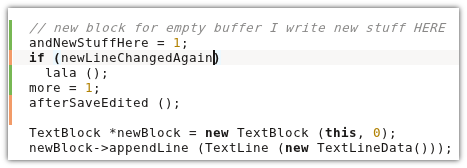
Kate has a shiny new line modification system. Read all about it in this dedicated article. Mandatory screenshot:
Document Variable (Modeline) Editor
Kate (and thus all applications use Kate Part) can be configured by using document variables, also known as modelines. Since it’s hard to remember all the available keys and values, a dialog helps out in the config dialog. You can read about all the details in this dedicated post (screenshots).
Documentation Updates
T.C. Hollingworth put a huge amount of work into the Kate and KWrite handbook. Thus, the documentation is much more up-to-date and we hope it helps to learn using Kate effectively more quickly. The official version is available on docs.kde.org.
Current State & The Road Ahead
Apart from the upcoming KDE 4.8 release, Kate turned 10 years old this summer. All in all, we can proudly say that Kate has a solid code base in its current state. The smart ranges were replaced by the moving ranges. Code folding is more clean with less bugs. Our plugins got a lot of updates. The documentation has improved. Of course, more help is always welcome. So if you are interested in Kate development, you are welcome to build Kate from sources and join our team by sending patches.
Thanks to everyone contributing to this great release :)