• Maintainer Needed: Kate – External Tools Plugin

    by  • August 9, 2011 • Common, Developers, KDE, Users • 22 Comments

    The “External Tools” plugin is one of the oldest plugins of Kate. A big hug to Anders Lund for writing it years ago, a lot of people enjoyed using it.
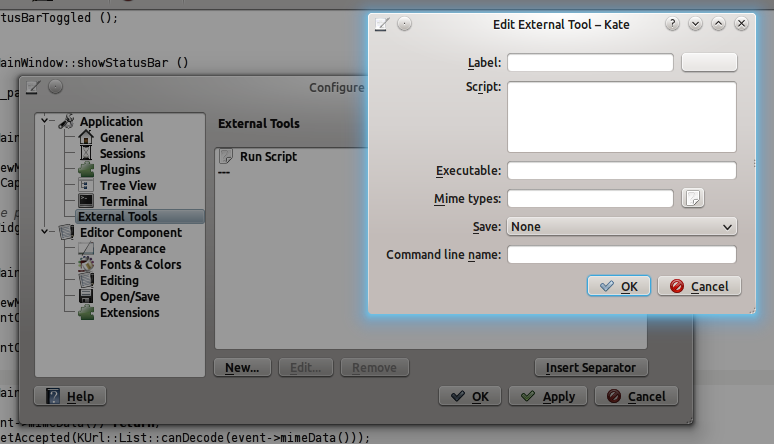
    It allows the user to specify own commands (aka snippets of shell programs) to be executed with the text of the current document or the current file.

    Basic stuff you can do with it:

    • Create you a little command that shows an Git/SVN/… diff of current file
    • Sort the file with command line sort program (or more advanced scripts)
    • Pipe the text of the document into your most loved perl script

    Unfortunately there is no maintainer for it at the moment. Therefore it will be disabled for KDE 4.8, as a lot of bugs sneaked into it during the late 3.x and whole 4.x life-cycle. (Mostly because of bad porting done by me and others and no time to fixup any real bugs)

    If you want to step up for maintainer ship, please contact me (cullmann@kde.org) or kwrite-devel@kde.org.

    Thanks a lot in advance ;P

    Btw., some of the bugs (now no longer valid but interesting for future maintainers):

    • https://bugs.kde.org/show_bug.cgi?id=117946
    • https://bugs.kde.org/show_bug.cgi?id=181528
    • https://bugs.kde.org/show_bug.cgi?id=261210
    • https://bugs.kde.org/show_bug.cgi?id=97569
    • https://bugs.kde.org/show_bug.cgi?id=110485
    • https://bugs.kde.org/show_bug.cgi?id=153963

    About

    Dr.-Ing. Christoph Cullmann is a Senior Software Engineer at AbsInt Angewandte Informatik GmbH. His work is focused on static analysis of both binary and source programs and the WCET analysis of embedded systems. In his spare time, he works on the KDE project and maintains the Kate editor application and component.

    http://cullmann.io/

    22 Responses to Maintainer Needed: Kate – External Tools Plugin

    1. David
      February 7, 2012 at 18:16

      That’s unfortunate.
      With that plugin one could configure Kate to compile a file by just pressing a key, etc.

      Please somebody pick this up. I do not want to resort to Emacs or Vim for simple things (i.e. 99% of the time).

    2. Mariusz
      March 2, 2012 at 15:58

      Will External Tools Plugin be back in 4.8.1?
      I guess I am not the only one that needs it badly!

    3. Secret
      March 19, 2012 at 21:51

      I just upgraded to KDE 4.8.x… just to see that an essential feature of my single most used application (Kate) is gone. And why? Because there are some feature requests which were not fulfilled (in that list THERE IS ONLY ONE REAL BUG, AND THAT IS STUFF NOT BEING TRANSLATED).

      Sorry, but this way of dealing with this issue simply sucks. Why couldn’t you just have let the code as it is? It is a really really simple plugin which does not need any serious maintanance, because it just fulfills an absolutely elementary task.

      So what now? In order to be able to run Makefiles from Kate on keyboard shortcut I need to compile my own version of half of KDE? Or step up as maintainer, simply close all the bugs as “won’t fix” and leave the code as it is?

    4. m
      April 7, 2012 at 10:57

      “External tools” was not only the oldest, but also the most helpful plugin. Removing it was really bad decision.

    5. April 23, 2012 at 09:13

      I use this every day. It is an essential part of my work flow.

      Removing this because it has a few bugs was a terrible decision. As a plugin, it already could be disabled. Why didn’t you just set it to disabled by default and allow those of us who needed it to turn it on at our own risk.

      Please revert this change by the next minor release.

      • Dorkmaster Flek
        May 2, 2012 at 15:51

        Agreed. I used this tool on a daily basis. Whatever bugs it had certainly didn’t impact my workflow. The decision to remove it is a huge mistake!

    6. Danilo
      May 3, 2012 at 16:10

      Please, take this tool back. I usally use it every day too. I’m being pratically forced to change my favorite editor.

    7. May 13, 2012 at 04:23

      I have tried to get this back by reverting the commits

      daea2a02e00007955cbcc892f0f5b06b0d8e6d9a
      60ceb16f288b276a0b8b835e589244c4551d4403
      798ae2fd2a2334515fe6d3592bbc3e71473840bb

      However, after I rebuild kate, the plugin still does not appear in the plugin list.

      • July 6, 2012 at 03:39

        Ok, I got it to work. You just need to revert the above commits (starting with the one at the bottom of the list) and compile and run kate.

        My mistake was not following exactly the directions on this page http://kate-editor.org/get-it/

        External tools will show up as before.

    8. Kaitain
      May 17, 2012 at 05:14

      Sigh. This is the last straw for me. I’ve been trying to learn assembler on Linux using Jeff Duntemann’s book, and there were various things mentioned in it that had changed radically in the last two years (since it was written). I’ve just about managed to get workarounds for most of them, but Kate is the main tool used and there’s no workaround for this plugin’s disappearance.

      The Linux environment is clearly too inconsistent and unreliable to make learning from a textbook viable. The ground just keeps shifting under your feet. I’m going back to Macs.

    9. Torw
      June 13, 2012 at 00:11

      This plugin was the only reason that I have been using Kate for…

    10. Ariel Baltert
      June 19, 2012 at 23:34

      What can we do? Is there a body that would respond to all our tears?

    11. Ariel Balter
      June 19, 2012 at 23:37

      Do you think there might be some way to hack the “Build” menu to do the same thing?

    12. Ariel Balter
      June 19, 2012 at 23:51

      This is not a comprehensive solution for what external tools did. But, for instance, to execute the current python file in an interactive external terminal, I made the following the Build target:

      konsole –hold -e /bin/sh -c “python -i %f”

      It also works in Quick Compile

    13. Danilo
      June 19, 2012 at 23:53

      Initially I won’t do this, but, because I needed change my editor app and appears the problem will not be solved, I recomend Sublime Text 2. Here is a tip how to run external apps (http://stackoverflow.com/questions/10465839/key-binding-how-to-run-a-external-script-external-command-program-in-sublime) on Sublime.

    14. June 21, 2012 at 07:46

      Well, I think we should keep pushing for this change to be reverted. Hopefully, a new maintainer will eventually appear and rewrite the plugin, however, I think they should have done that first and then swapped the old for the new instead of just removing the feature entirely.

      I would be ok with reverting the changes myself and building kate from source (and posting a guide on how to do so), however as I posted above, I tried this and it didn’t seem to work.

    15. Andy Goss
      June 26, 2012 at 10:03

      Kate was the reason I moved to KDE in the first place, and the external tools that allowed me to implement a word count are essential for my work. I never found any bug, but then I only used them for the word count. If a built in word count is asking too much, surely not impossible if it can be done with a short script, then please give us back the external tools!
      Meanwhile I will have to look elsewhere for a text editor.

      • k
        November 26, 2012 at 19:33

        add an external tool, with this script:
        cd %directory
        msg=$(wc %filename |awk ‘// {printf(“#%d lines\n#%d words\n#%d chars\n”, $1, $2, $3)}’)
        kdialog -title “Word count” -msgbox “$msg”

        there’s also lines and characters in there, but you can figure out to remove them yourself if necessary!

        enjoy

    16. June 26, 2012 at 12:54

      May be the possibility to do a lot of such stuff with python in one of the next releases will help you, see:

      http://kate-editor.org/2012/06/26/extending-kate-with-pytho/

    17. May 15, 2013 at 11:36

      I have been asked multiple times on how to execute a script from within Kate with a single button or keyboard shortcut. Supposedly, some people have a strong aversion against the terminal ;) . Anyway, I considered properly resurrecting the external tools, but don’t have enough time for now. As a workaround based on Ariel Balter’s idea of abusing the build plugin, I wrote a bash one-liner which executes scripts based on their shebang. If no shebang is present, an appropriate error message is shown. If someone else is interested in using this:

      1. go to settings->configure kate->plugins and make sure the build plugin is enabled
      2. close the settings and open the ‘build output’ tool view
      3. in the target settings tab, create a new target with an appropriate name; paste
      “”"
      konsole --noclose --hide-menubar --hide-tabbar -e /bin/bash -c 'first=`head -n1 %f`; if [[ $(echo "$first" | grep "^#!") ]]; then ${first:2} %f; else echo "file does not have a proper shebang"; fi'
      “”"
      as single line in the quick compile field.
      4. in settings->configure shortcuts add a shortcut for quick compile

      From then on, you can execute scripts from within Kate (tested in 3.10.2 and 3.11 from git) with a single shortcut. The downside is that the build output tool view opens whenever you launch a script.
      Enjoy :)

    18. Steve Long
      May 21, 2013 at 16:52

      I use the Quick Compile setting from Build Plugin for this, as described by Gerald de Crancy at the end, with this line for C projects (I use a makefile, but you could compile however you choose.):
      “”"
      f=’%f’; f=${f##*/}; case $f in *.c):;; *) echo “$f is not a C source!” >&2; exit 1;; esac; f=${f%.c}.o; rm -f “$f”; make V=1 “$f”
      “”"
      That is set to trigger off Ctrl-Shift-C, and -B does the standard ‘make’. For ‘make clean’ I just click on the menu.

      You could check for a shebang if you wanted, in the * case, or just remove the extension unconditionally and use: “${f%.*}.o”, or switch on file extension to object.. You can even just call a standard wrapper written in any language you like.

      Note that the Build Plugin is configured separately for each session and can have multiple targets; not so useful ime, since most of the time the session defines the focus, and you just want the keyboard shortcut doing the right thing. ‘Attach as Tab to..’ in KWin-4.9+ defines the workspace as two or more sessions if required. Thankfully, with this, the taskbar moving around is no longer an issue (in fact I now just let windows cover it instead for more vertical space.)

      HTH,
      steveL

    19. Steve Long
      May 21, 2013 at 16:55

      Er the above was in response to David at the top. Not sure why it’s at the end. And I see my attempt to duplicate Gerald’s monospace effect failed miserably :roll: Apologies for any confusion.