• Highlight Selected Text

    by  • 2010-11-14 • Users • 28 Comments

    Kate has a new plugin called “Highlight Selection”. Since it is a KTextEditor plugin, it is available for all apps using KatePart (e.g.: Kile, Kate, KWrite, KDevelop etc). What does it do? If you select a whole word, all occurrences of this word are highlighted as well:
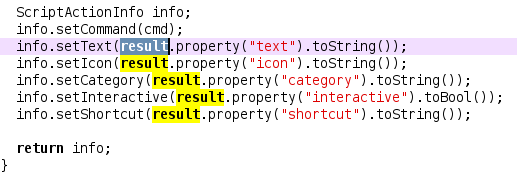
    You can jump to the next occurrence with ctrl+h (btw: ctrl+h works already since KDE 4.2 or so). The plugin will be included in KDE 4.6. If you can’t wait, you can use it already now by building Kate from the sources.

    (Side note: Be careful with enabling this plugin in KDevelop, since KDevelop itself is already doing extensive highlighting)

    About

    Dominik is a PhD student at the Control Theory and Robotics Lab, TU Darmstadt, as part of the Research Training Group GKMM (GRK1362). My research focuses on state estimation in distributed systems. As hobby, I contribute to the KDE project and work on the Kate application and editor component.

    http://www.kate-editor.org

    28 Responses to Highlight Selected Text

    1. Sven
      2010-11-14 at 15:10

      Great. Cool stuff. I missed that from notepad++.

      Thanks & Regards
      S.

    2. manolin
      2010-11-14 at 18:42

      Yay, if you continue in that way we’ll end up calling kate “katedevelop” :p

    3. 2010-11-14 at 21:09

      To investigate elements, wonderful property, I didnt felt existence of this until, I used some heavy editors (like netbeans),

    4. Svempa
      2010-11-15 at 11:06

      Nice!

    5. DanaKil
      2010-12-29 at 14:13

      I missed that from notepad++ too, many thanks ! It would be great if, like NP++, this plugin could highlight the closing HTML tag when the cursor is on the opening tag (and highlight the opening tag when the cursor is on the closing tag…)

      But maybe this is a completely different scope or a feature best suited for Quanta…

    6. Thomas Olsen
      2010-12-30 at 01:15

      I can’t seems to find that plugin in Kate Version 3.5.90 using KDE Development Platform 4.5.90 (4.6 RC1)

      • haumann
        2010-12-30 at 12:28

        In the config dialog: Editor component > Extensions > Highlight Selection

    7. Thomas Olsen
      2011-01-3 at 10:24

      Hmm. I can’t find that under Kate Version 3.5.90 using KDE Development Platform 4.5.90 (4.6 RC1) but maybe it isn’t included in the first RC?

    8. Highlighter
      2011-01-3 at 21:03

      Why would you EVER interrupt the use of a nice feature (selection highlighting) just to re-insert it in the form of a plugin!?!?!
      I used to use (and highly depend on) the feature just fine in version 3.4.2, only to discover a bitter surprise in v3.5.1 and now I have to wait for KDE 4.6?
      Kate is probably the best editor I’ve used (and I’ve used literally everything except emacs), but this move was just idiotic! WHY WHY WHY!?!?d

      • haumann
        2011-01-3 at 23:00

        Sorry, but this functionality was never in kate before… what do you mean exaclty? “Highlight all” in search&replace? This is still there as explicit action called “Find all”… Please be less harsh with the words you use ;)

    9. KIAaze
      2011-03-16 at 13:46

      Hi,
      I can’t get this plugin to work on Ubuntu 10.04.2 LTS.
      I built kate from source following the instructions in the link you gave, but can’t find the “highlight all” plugin in the config dialog.
      I did start it with ~/kde/run.sh kate as per the instructions.
      git commit number is 56a1930ae5f1a1e9e94ff05f4f3954f2943cdd2b

      • haumann
        2011-03-18 at 01:07

        Correct: Settings > Configure Kate > Editor > Extensions –> [x] Highlight Selection
        Wrong: Settings > Configure Kate > Kate > Plugins

    10. razorx
      2011-03-22 at 23:00

      Nice, I was missing this feature from Notepad++. One question:

      How do I change the highlight color?

      I use a dark theme, and the yellow background makes the highlighted text unreadable! I have the same issue with text highlighted via Find All (also yellow) and Find / Replace (green background). I cannot find where this color is set anywhere. I have searched my home dir and the src for “255,255,0″ and not had any luck with finding where this color is defined.

    11. Clemens
      2011-05-3 at 12:29

      Not working for me…
      My (german) kate 3.6.2 with KDE 4.6.2, Kubuntu 11.04 has 6 Extensions; I tried activating all of them… No highlighting!
      Has it been removed?
      I am only here, because I saw this feature once or twice in Kubuntu 11.04 alpha and I liked it.

      • haumann
        2011-05-3 at 19:47

        You have to enable the plugin under “Editor” in the settings dialog, not under “Application”. Maybe it’s called “Erweiterungen” or so. The plugin is really supposed to be there. If you want, please paste a screenshot of your config dialog.

    12. lxt
      2011-05-5 at 19:32

      the plugin does not work under several locales german included. I have to set LANG=C before launching kate to use it.

      https://bugzilla.redhat.com/show_bug.cgi?id=701151

    13. burial
      2011-05-10 at 14:32

      Can someone tell me how to change yellow background color on search result ?

    14. josch
      2011-08-5 at 11:29

      Is it possible to configure the plugin in a way that it keeps the yellow background coloring but doesn’t make letters bold?

      • 2011-08-5 at 12:08

        Right now not. But I’ll add a config page, so you can configure the color and whether it’s bold or not.

        • josch
          2011-09-19 at 17:39

          Hello Haumann,
          I was just wondering if there has been any progress with the config page. Will you announce this on this website?

        • 2012-01-22 at 15:56

          This is biting me too. I use a dark color scheme and yellow makes it totally unreadable. Please fix it soon.

    15. King_DuckZ
      2011-10-2 at 19:39

      Thanks for the extension, I’ve been waiting for this feature. However me too I use a dark theme, and white text on yellow background is not visible at all.
      +1 for adding a way to configure the highlight style.

    16. Alex
      2012-02-9 at 19:18

      would be nice to have a shortcut to edit all highlighed items (like qtcreator) :-)

      • 2012-02-11 at 10:23

        ctrl+r ? it brings you into search&replace…

    Leave a Reply

    Your email address will not be published. Required fields are marked *


    *