• KateSQL, a new plugin for Kate

    by  • July 29, 2010 • Developers, Users • 42 Comments

    Hello,

    today i will show you a new plugin for Kate, called KateSQL.
    As you may have guessed, it brings to Kate the basic features of an SQL client, allowing you to open connections, execute queries, and display result data from SELECT statements or stored procedures.
    Since this plugin makes an extreme use of the Qt Sql module, most of database drivers are supported..

    Said this, let me explain how it works..
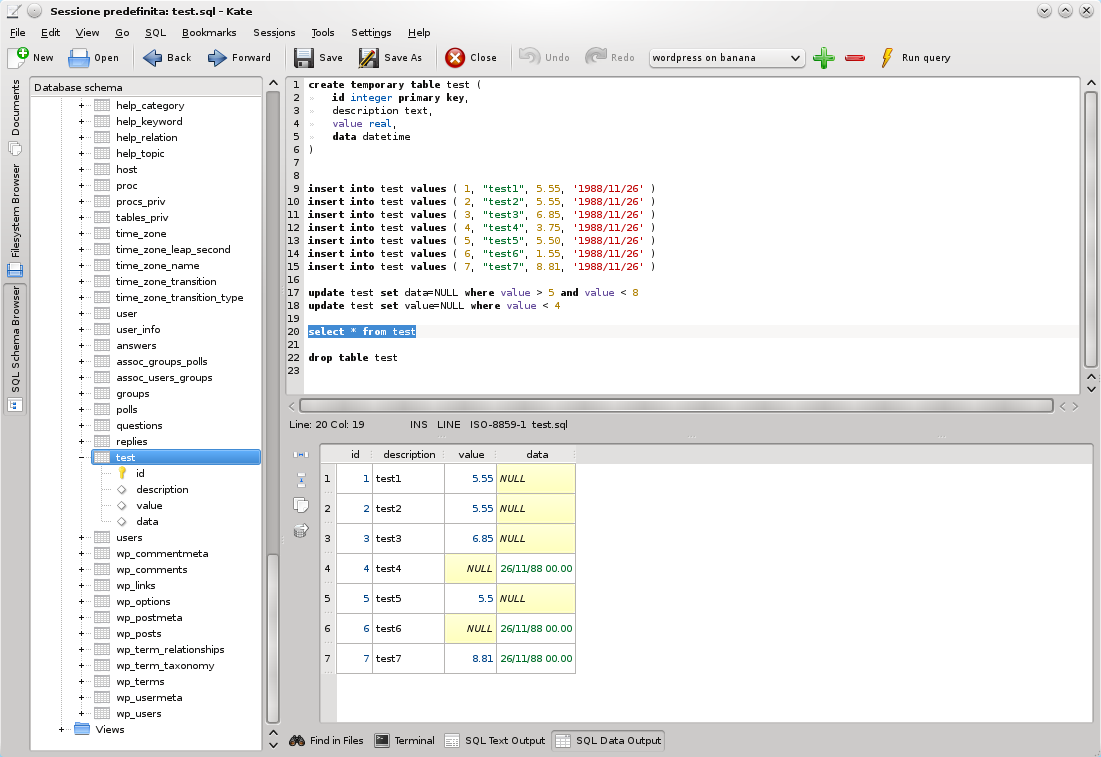
    Kate MainWindow with KateSQL widgets

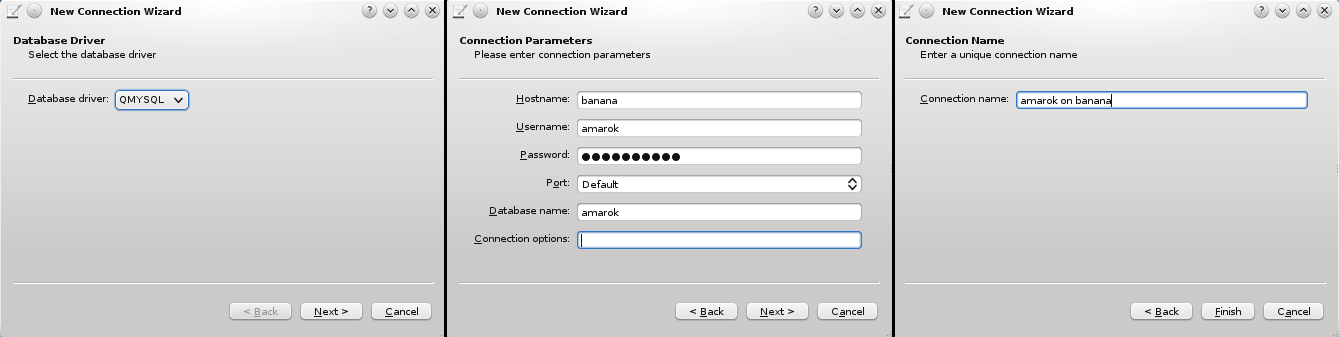
    First of all, you have to create a new db connection through a simple wizard, specifying driver, connection parameters (hostname, username, password, etc…), and a descriptive name, that KateSQL will use as identifier.
    Done this, what you need to do is just select the query text in the editor and press F5 (or your preferred shortcut). The whole text will be executed through the selected connection.
    For SQL output, two toolbox are disposed in the bottom area:

    • The first will show messages returned from the server (errors in red, others in green, like number of affected rows).
    • The second contains a table view with a custom model associated, to show resultsets of a query. This custom model does nothing more than a QSqlQueryModel, only provides colors and formatting for each cell..

    Ah, about this, my last commit implements a configuration widget that let you choose colors and font styles for text fields, numbers, blobs, nulls, booleans and dates… cool, yeah? :)
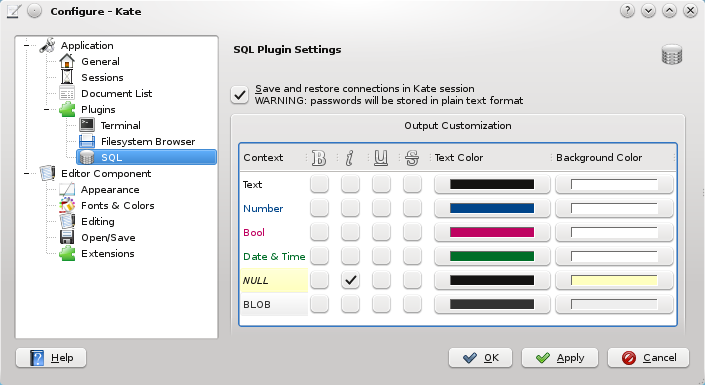
    KateSQL Configuration Dialog

    Last but not least, on the left panel you can find a basic and useful schema browser, that show the tree schema of the database connection currently selected. With this tree widget you can browse through tables, system tables and views, up to individual fields. obviously, primary key fields are distinguished by the classic yellow key icon.

    Currently, there are few problems with multiple query handling.. Some engines doesn’t supports it natively, others can receive queries separated by a semicolon, but the QSqlQueryModel can handle only one resultset at time.. probably the best solution is to parse the text, split queries, and execute them separately.. Surely, this feature will be implemented soon.
    Stay tuned!

    Of course, if you want to help us with development, you are welcome!

    42 Responses to KateSQL, a new plugin for Kate

    1. senkal
      July 30, 2010 at 01:11

      WOW. It will really speed up my work. css, html and next tab sql nice :D

    2. aseigo
      July 30, 2010 at 01:36

      i’m using this plugin for a project i’m working on and all i can say is this: thank you, thank you, thank you. i’m no longer dependent on psql in konsole. multiple tabs for queries == pure win.

      the one thing that’s keeping psql around still though is the innability to do things like “alter table ..”; it would be great if it could run such data definition statements as well.

      as for the use of F5, that conflicts with the default shortcut in kate for reloading a file. could i recommend Ctrl+E for execute?

    3. eliasp
      July 30, 2010 at 05:04

      This looks just great – will be definitely used a lot here.
      But why do you store passwords as plain text? Don’t you use KWallet?

    4. Marco Mentasti
      July 30, 2010 at 10:05

      @aseigo:
      about dds, have you tried to execute it? on mysql works fine, i think that there shouldn’t be differences with pgsql.
      CTRL+E, promoted :) certainly better than a shortcut conflict.

      @eliasp:
      i did a test few weeks ago (kwallet is very easy to implement), but i encountered some logical problems.. i’ll ask in IRC for a solution!

    5. July 30, 2010 at 10:11

      :) Thanks again for creating this plugin, it is that nice to see that Kate is extensible enough for such workflows ;)
      Too bad we still lack a good howto about writing plugins, whereas the plugin architecture is more or less stable since 5 years :(
      Perhaps should find time to write howto .P

    6. July 30, 2010 at 11:00

      Wow. I would love to have something similar for Soprano.

    7. July 30, 2010 at 13:57

      This is really awsome stuff. Thanks for creating this! Looking forward to getting my hands on it.

    8. Werner
      July 30, 2010 at 18:09

      Fantastic! Thank you!

    9. Dave
      July 30, 2010 at 20:24

      Hope this doesn’t come across as negative:

      I’d rather see this turned on it’s head and as an SQL editor which uses a Kate part and all the stuff you’ve shown above. I think it’d have more scope for you to provide a better SQL front end.

      From a user POV, I wouldn’t think to fire up a text editor if I wanted an SQL query tool/editor. I’d search for an app to do it, which means I’d end up using kmysqladmin instead of this – and frankly yours looks better. When I’m in Kate for anything else, even hacking together some websites, I don’t think I’d have an urge to fire off SQL directly. It’d be less confusing for it to be a different program.

      Good work anyway, just sharing my initial thoughts.

      Dave

      • July 31, 2010 at 00:54

        Whereas I can understand that some people prefer one tool for one task, the problem with that idea is: Kate provides already a nice framework to put in toolviews, to handle multiple text documents and so on. If you create a plugin for Kate, you can focus on your task. This is here to provide best possible SQL integration for an editor. If you start from scratch and build a standalone application that uses KatePart, which is nice too, you need to come up with the whole application infrastructure yourself.

        Therefor I think a lot stuff like this should more likely be a plugin for Kate than a standalone application, to share the framework code.
        For example an other nice plugin is the Kate GDB plugin. It provides a very simple GDB integration, which doesn’t do much more than give you the GDB commandline in Kate but auto-open all sources in Kate itself.
        That is really easy to implement but of great value. And given it is a plugin that uses the whole Kate infrastructure, it is much less stuff to maintain than yet an other standalone debugger.

        One point that is valid thought: Kate’s plugin architecture needs to be enhanced, to provide even tighter integration, for example passing command line arguments to a plugin or enabling a plugin via command line (for example to have a simple “alias katesql=”kate –plugin=katesql” that fires up a Kate instance with loaded sql plugin ready to go)

        • Dave
          July 31, 2010 at 12:45

          Thanks for replying :-)

          I can see what you mean, when looking at it from a developer POV. It makes a lot of sense. Though all your arguments are from the developer’s side (your side) not arguing against any of the benefits on the user side.

          I’d like to think you’ll get a lot of developer’s on board with the Kate plugin, now you have something very usable, and then a move gets considered at some point way in the future.

    10. July 31, 2010 at 08:07

      WOW! You are my hero, this is going to speed up my work a lot!! :D

    11. kickmetoandy
      July 31, 2010 at 08:34

      are there any plans for a formatter that formats the sql string. because that would be really helpful for very long sql statements.

    12. Marcel
      July 31, 2010 at 16:05

      Really nice! I like that and will surely be using it :-D

      Would it be possible to also extend that into the LDAP-world? :-) KDE is missing any GUI for LDAP-work for now.

    13. Werner
      July 31, 2010 at 16:41

      I am aware that this might be a bit off-topic here, but I’m enjoying this new KateSQL plugin so much, and it’s adding so much productivity to my PHP development, that I can’t help thinking about how much I miss the Kate HTMLtools Plugin of KDE 3. It was so nice to easily insert HTML tags, I really wonder why it disappeared.

      Is there a place where those old plugins can be downloaded, or do they have to be rewritten to be compatible with Kate 3.4.x?

      • Werner
        July 31, 2010 at 16:58

        Oh wait, I just read the XML Completion Plugin post and realised that tags can actually be inserted via the all-new ported XML Completion Plugin – yay!

        Just one problem… It’s a bit buggy. Although pressing Ctrl+Enter brings up the tag insertion dialog, nothing happens when it’s submitted. I guess I would post this in the XML Completion Plugin topic, but it looks like comments are disabled over there.

    14. Andy W
      August 6, 2010 at 22:20

      any chance to get a decent sql formatter like the one you can find here (http://www.sqlinform.com/online.phtml) ? and i am not talking about the number of configuration options, a lot fewer might also work.

    15. LXj
      August 25, 2010 at 13:00

      In which release of Kate will it be included? I can’t find this plugin in KDE 4.5

      • Marco Mentasti
        August 25, 2010 at 18:00

        since this plugin was released after KDE 4.5 feature freeze, it will be included in KDE 4.6

    16. The User
      August 26, 2010 at 16:14

      Is there any chance for KDevelop-integration?

      • Marco Mentasti
        August 26, 2010 at 16:51

        Yes, this plugin can also be ported to kdevelop infrastructure without heavy changes, i think..
        i’ll look for this in the near future ;) ..i hope
        ps: some months ago i found a similar plugin for kdevelop in playground, but it looked like a draft, and now the readme file says that the plugin is now ported to Quanta :|

        • August 26, 2010 at 18:03

          It would be more useful to have this, if we could actually share plugins between kate/kdevelop, as otherwise, lots of code needs to be duplicated. But I guess that will be hard, as kate and kdevelop have a very different interface.

    17. Sam Tuke
      January 27, 2011 at 11:25

      Fantastic work. I’ve been in love with kate for years, and I can’t believe my luck with all these new features that it’s getting.

      This SQL functionality could really improve my efficiency.

      Will these features also be implemented into Kdevelop soon, or are they already there?

    18. ak
      January 28, 2011 at 17:08

      can’t set postgres?

    19. January 28, 2012 at 16:20

      Is there any support for PostgreSQL?
      I’m using KATE a lot lot lot and pgadmin3 aside, if I could kick out pgadmin3 (I use it mostly for super simple SELECT queries on work) out of that bundle I’d be happy as a piggy in mud :o )

      • February 4, 2012 at 22:07

        Yes, as long as the Qt PostgreSQL driver (QPSQL) is installed on your system.

    20. Ilko Kacharov
      June 19, 2012 at 12:19

      The plugin is very useful but needs some improvements. I’m talking about a reconnect button, now after a while the database gets disconnected and i have to quit and start again Kate. The other one is that i’m not using Kwallet so the password for the database is not saved, which is annoying to type it in every time.

      Greetings! :)

      • Marco Mentasti
        July 6, 2012 at 20:33

        I agree with you, disconnections are not well managed, mainly because i don’t receive any kind of signal from qt about disconnection. i’ll try to improve this, i promise :)
        also about password management, i can add an option to save passwords in the session configuration, but of course they will be stored in clear text. what do you think?

    21. Emmanuel
      July 6, 2012 at 15:34

      I love your work.I have a question.Is there a way to set the encoding during connection?This would be very useful to me…

      • Marco Mentasti
        July 6, 2012 at 20:23

        according to qt documentation the sql framework automatically uses unicode if supported by the database engine, otherwise UTF. Also searching in api documentation it seems that there’s no way to set text encoding. Maybe with a particular connection option. which database driver are you using?

        • Emmanuel
          July 9, 2012 at 11:24

          First of all thank you for your fast reply.

          I am using mostly the freedts library (QDTS7) from the list of the connection wizard of the plugin…
          Thanks in advance for your time…

        • Emmanuel
          July 9, 2012 at 11:44

          Sorry i meant the ‘freetds’ library and (QTDS7) option from the list of the connection wizard :D

    22. August 21, 2012 at 23:05

      My Remote hosts are only allowing ssl encrypted connections. Can I and how – can I use your awesome plugin with ssl encrypted connections?

      Mythli <3

    23. Artur Bać
      October 2, 2012 at 00:35

      Small patch for allowing loading of external sqlite plugins like spatialite or custom

      by default sqlite has turned off permision to do so and we need to call
      sqlite3_enable_load_extension( handle, 1 );
      on opened database handle.

      diff –git kate/plugins/katesql/CMakeLists.txt kate/plugins/katesql/CMakeLists.txt
      index 6b088ad..9baf7f9 100644
      — kate/plugins/katesql/CMakeLists.txt
      +++ kate/plugins/katesql/CMakeLists.txt
      @@ -27,7 +27,7 @@ kde4_add_plugin(katesqlplugin ${katesql_SRCS})

      add_subdirectory(pics)

      -target_link_libraries(katesqlplugin ${KDE4_KDECORE_LIBS} ${KDE4_KDEUI_LIBS} ${QT_QTSQL_LIBRARY} kateinterfaces ${KDE4_KTEXTEDITOR_LIBS} )
      +target_link_libraries(katesqlplugin ${KDE4_KDECORE_LIBS} ${KDE4_KDEUI_LIBS} ${QT_QTSQL_LIBRARY} kateinterfaces ${KDE4_KTEXTEDITOR_LIBS} sqlite3)

      install(TARGETS katesqlplugin DESTINATION ${PLUGIN_INSTALL_DIR} )

      diff –git kate/plugins/katesql/sqlmanager.cpp kate/plugins/katesql/sqlmanager.cpp
      index 8405cca..b80117b 100644
      — kate/plugins/katesql/sqlmanager.cpp
      +++ kate/plugins/katesql/sqlmanager.cpp
      @@ -29,6 +29,7 @@
      #include
      #include
      #include
      +#include

      using KWallet::Wallet;

      @@ -37,6 +38,7 @@ SQLManager::SQLManager(QObject *parent)
      , m_model(new ConnectionModel(this))
      , m_wallet(0)
      {
      + sqlite3_initialize();
      }

      @@ -83,7 +85,17 @@ void SQLManager::createConnection(const Connection &conn)

      // try to open connection, with or without password
      if (db.open())
      + {
      m_model->setStatus(conn.name, Connection::ONLINE);
      + QVariant v = db.driver()->handle();
      + if (v.isValid() && qstrcmp(v.typeName(), “sqlite3*”) == 0) {
      + // v.data() returns a pointer to the handle
      + sqlite3 *handle = *static_cast(v.data());
      + if (handle != 0) {
      + sqlite3_enable_load_extension( handle, 1 );
      + }
      + }
      + }
      else
      {
      if (conn.status != Connection::REQUIRE_PASSWORD)

      • March 25, 2013 at 10:13

        Hi Artur, can you please send this patch again to kwrite-devel@kde.org?
        It looks as if some characters got lost due to html interpretation.

      • May 29, 2013 at 11:51

        Artur, is this included in Kate by now?

    24. BASILIO
      January 14, 2013 at 09:20

      Ich verstehe es nicht, wie kann ich diesen Plugin herunterladen?
      Debian 6 / 2.6.32 amd64
      Gnome 2.30.2
      Kate 4.4.5 (3.4.5)

    25. epifone
      March 18, 2013 at 09:54

      How does one connect to oracle as sysdba?

      Thanks to all who have contributed to this plugin. It really is very nicely done.

    26. Chazz
      April 4, 2013 at 17:02

      I wanted to post information about how I connected to a MS sql server using ODBC.

      I first had to install freetds and supportive libraries in my opensuse 12.3 installation:

      zypper install libqt4-sql-unixODBC libfreetds freetds-tools libtdsodbc0

      Then configure your ODBC settings in /etc/unixODBC/odbc.ini using the following driver:

      [mysource]
      Driver = /usr/lib64/libtdsodbc.so.0
      Server = dbserver.example.com
      Database = foodb
      Port = 1433
      TDS_Version = 8.0

      Your specific odbc settings may be different.

      Finally, in KateSQL, create a new QODBC3 connection. Specify the ODBC datasource name from your odbc.ini in the server field (not the actual database server).

      This is what worked for me.

    27. Dmitriy Geels
      May 28, 2013 at 10:02

      Hello!

      I’d like to ask for a little usability improvement: if no text selected, apply ‘execute query’ command not to all editor contents, but to statement under cursor. Statements could be easily separated by ‘;’