• GSoC – Swap Files for Kate

    by  • July 12, 2010 • Developers • 19 Comments

    Hello,

    As mid-term evaluations have started, I would like to show my current state of GSoC project, because I’ve never found the time to do it.

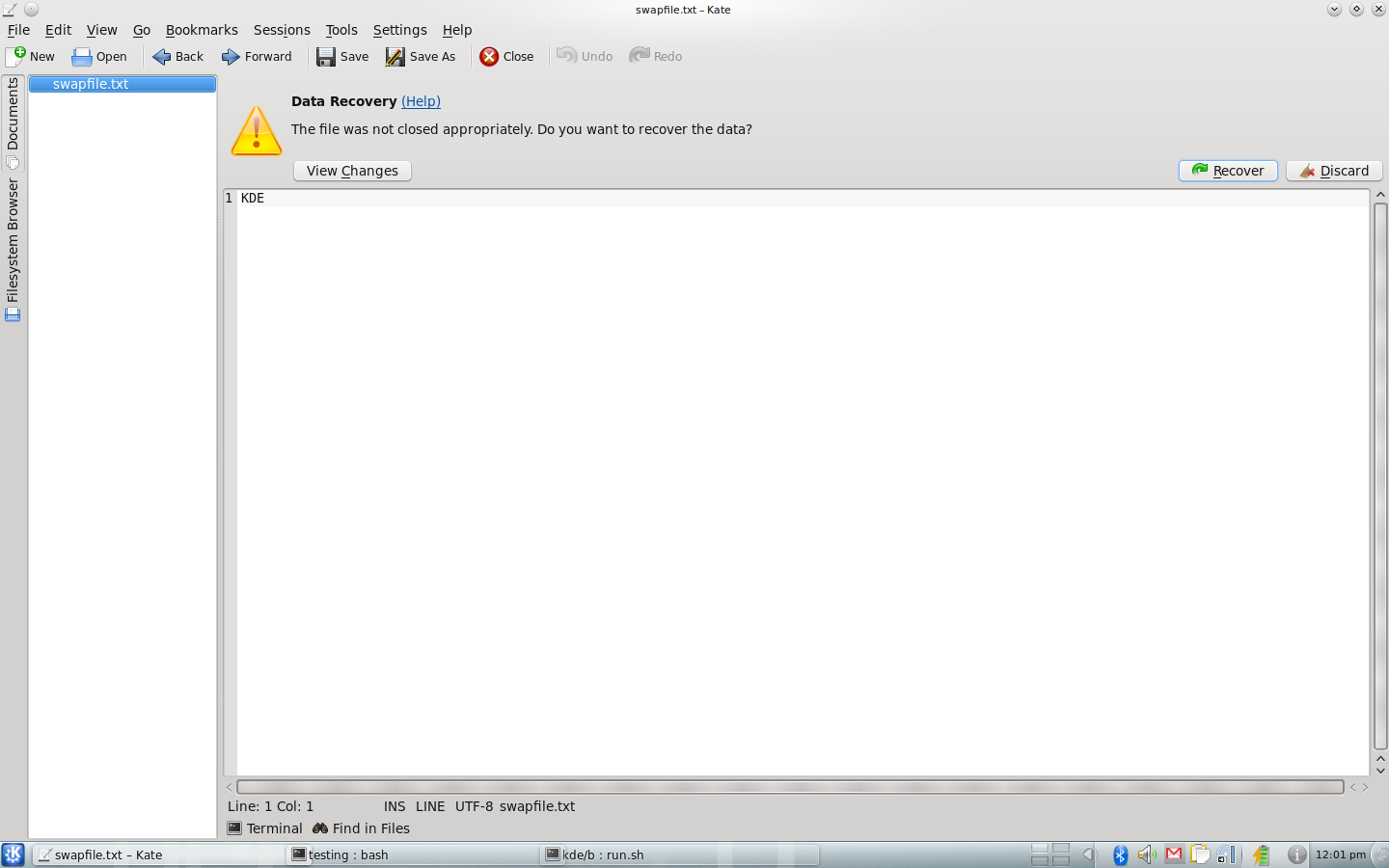
    The swap file feature is implemented, except for the view differences feature and few TODOs. Some more testing need to be done, though. Below are some screenshots of how it works.

    When you start editing in a document, a swap file for the document is created (“.swp.originalFileName”). If Kate crashes and the user didn’t save the changes, the swap file remains on the disk.

    On the load of the original file, Kate checks if there is a swap file on the disk, and if it is, a warning bar pops from the top, asking if you either want to recover the data loss, discard it or view differences. If the recover button is pressed, the lost data is replayed. Otherwise, if the discard button is pressed, the swap file is removed from the disk. This also happens on normal close and on save of the original file.
    Many thanks to Christoph and Dominik who helped me get it through.

    About

    19 Responses to GSoC – Swap Files for Kate

    1. Timo
      July 12, 2010 at 12:50

      Isn’t this already implemented in some editors with a different naming convention (something like ~originalfile.name)? Or is this actually more than a working copy of the file? If it’s the same feature, wouldn’t it be better to use the same naming convention to ensure interoperability?

    2. dianat
      July 12, 2010 at 13:30

      I think it’s actually originalFileName~, which represents a backup file for the original one (kate also creates a backup file).
      The swap file is for recovery only (Vim’s swap files are named .originalFileName.swp).

    3. July 12, 2010 at 17:33

      eee! awesome! :)
      and the UI is even non-modal! damn that looks slick.

      Timo: yes, vim uses .filename.swp – but vim’s buffer is in some sort of binary format iirc, so probably not compatible with kate’s.

      • July 12, 2010 at 19:53

        Yes, the vim swap files are as far as I know not document format wise, which is bad. But on the otherside, it would make little sense to have there any compat stuff which might break. It is a pure last resort crash recover feature. It should just work for Kate. There is still some stuff to do, for example at the moment we data sync too often, which is bad, but that can be fixed, its a long way to go for KDE 4.6.

    4. July 12, 2010 at 22:19

      I hope this minimizes the amount of swap files in my documents folder. I used to use Emacs, and it would leave swap files like crazy. Hopefully, I’ll finally stop seeing them left behind.

      • haumann
        July 12, 2010 at 22:33

        A swap file is deleted on a successful save and if you discard the changes if you close a document. So in the normal case a swap file exists only if you have modifications in your current document.

    5. Me
      July 13, 2010 at 10:52

      Does it work for new files not yet saved ? If yes, in this case, where are these swap files saved ?

      • haumann
        July 13, 2010 at 16:37

        No, for unsaved buffers it does not work. And I would argue that if you want to prevent loosing data, you should save your work to a file anyway. So we most probably will not implement it.

        • Me
          July 13, 2010 at 16:49

          Fair enough. Thanks for the reply.

        • Pascal
          July 14, 2010 at 15:37

          Only a very small portion of the people I know start by saving the file they are going to write. Most save when they are done. Saving is a disturbance in the process of writing it. I have myself lost data many times where this is the case, and it sucks. Doing a temp file in [kate-config-dir] would make a lot of sense.

          • haumann
            July 14, 2010 at 16:32

            Pascal, you are certainly correct. We’ll first finish this for files. The code is there and could be used for empty text buffers as well, of course. But this is not high priority. If you use sessions or work on projects, you usually do have files :)

    6. mat69
      July 13, 2010 at 17:59

      Just interested, but how does it work?
      Do you save just the edit-commands thus ignoring the unchanged parts –> so that the swp file is just a file that contains commands to reach the last state?

    7. dianat
      July 13, 2010 at 19:53

      Yes, save the actions in the swap file and replay them over the original data on recover.

    8. Pascal
      July 14, 2010 at 15:39

      How does it handle network-transparency?
      Does it constantly send the changes to the remote server? And if this is the case, will be asynchronically so it doesn’t stop the program for a few seconds on a slow line?

      Will it save the undo actions?

      • haumann
        July 24, 2010 at 12:11

        It only works for local files.

      • Matt
        May 20, 2011 at 18:26

        Looks like it does the very thing you were afraid of and now I’m annoyed about. This is a big problem on sshfs where it slows down typing immensely because it’s not doing it asynchronously (kate 3.6.2 on kde 4.6.2)

        • Matt
          May 20, 2011 at 18:31

          Ok I fixed the problem. If you’re using sshfs, you’ll want to disable this useless swapping which slows down typing to a crawl when using sshfs: Open/Save -> File Opening & Saving -> Advanced -> Disable swap files syncing.

          • September 19, 2012 at 17:41

            Doesn’t work for me. I’ve disabled it years ago (when recovery was introduced in kate), and every time kate starts up it annoys me with the question about recovery for some of the files it opens when restoring the latest session.
            Kate doesn’t write any swap or backup files because I’ve disabled that. No idea where it gets the information from that “the file wasn’t closed properly”. That misfeature is a major annoyance when it can’t be turned off. Kate used to be my favorite editor; now I find myself using kwrite a lot just because kate’s recovery feature gets on my nerves.

    9. mikkle
      May 19, 2013 at 21:41

      Hey, this post is really old now, but the ability to disable this doesn’t work on Kubuntu 13.04, KDE 4.10.2. One thing I don’t like about this is continuous syncing-while-typing with cloud services like dropbox. You can pause dropbox, which helps a bit, not all such services have such a pause option (e.g. sugarsync). It’s also constantly keeping the hdd working so that it can never go into sleep on a laptop, which decreases battery life. By how much? Who knows, but probably enough to want to disable it if you don’t think you’ll ever need it and have never needed it. (Also the ability for auto-backup makes this feature even less useful, in my opinion.) (I know there is already a closed bug filed for this problem of disabling not working, but thought I might just vent here a little–sorry!)