Kate: Scripted Actions
Finally, I came around to implement scripted actions for Kate in KDE SC 4.6. Let’s take a look at how this works. When Kate starts, it searches for $KDEDIRS/share/apps/katepart/script/ for *.js files. As example, let’s take a look at utils.js there:
/* kate-script
 * author: Dominik Haumann Haumann
 * license: LGPL
 * revision: 3
 * kate-version: 3.4
 * type: commands
 * functions: moveLinesDown
 */

function moveLinesDown()
{
  var fromLine = -1;
  var toLine = -1;

  var selectionRange = view.selection();
  if (selectionRange.isValid() &&
      selectionRange.end.line < document.lines() - 1)
  {
    toLine = selectionRange.start.line;
    fromLine = selectionRange.end.line + 1;
  } else if (view.cursorPosition().line < document.lines() - 1) {
    toLine = view.cursorPosition().line;
    fromLine = toLine + 1;
  }

  if (fromLine != -1 && toLine != -1) {
    var text = document.line(fromLine);

    document.editBegin();
    document.removeLine(fromLine);
    document.insertLine(toLine, text);
    document.editEnd();
  }
}

function action(cmd)
{
  var a = new Object();
  if (cmd == "moveLinesDown") {
    a.text = i18n("Move Lines Down");
    a.icon = "";
    a.category = "";
    a.interactive = false;
    a.shortcut = "";
  }

  return a;
}

function help(cmd)
{
  if (cmd == "moveLinesDown") {
    return i18n("Move selected lines down.");
  }
}
What happens is the following:
- the header tells kate that there is an exported function “moveLinesDown”
- so when Kate Part is loaded, it calls “action(moveLinesDown)” to check whether this function should be exposed in the GUI. Here, we return the action info that includes the displayed text, an icon, a category, whether the script needs user input (interactive) and a default shortcut. Of course, you can change the shortcuts, and also configure the toolbars to show the actions.
With this, every user is able to script arbitrary editing functions for Kate Part. We don’t have to implement all those helpers in C++ anymore. The result looks like this: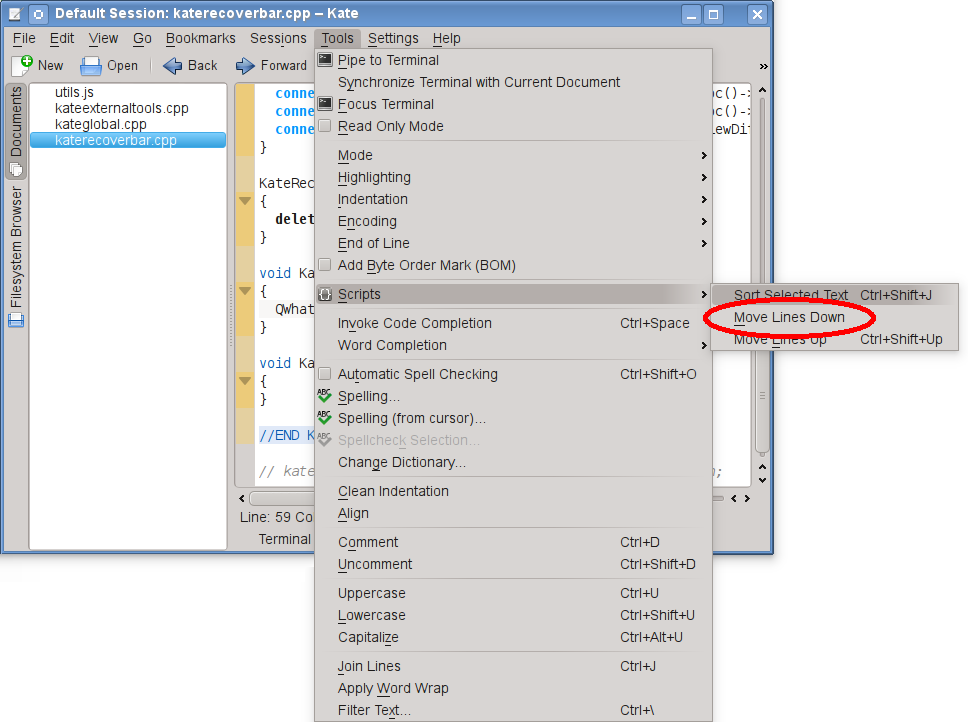 You can have this already now, you just have to use the development version of Kate :)